
Showing posts with label Electronics. Show all posts

Thursday, January 26, 2012

New Xbox 360 Dashboard

I have played with the updated Xbox 360 dashboard for a few weeks, and really am enjoying several of the new features.  The new additions that I like are better support for using an Xbox Live account on multiple Xboxes and improved support for  new video content sources.

Multi-Xbox support


We have two Xboxes in our house.  The second Xbox is upstairs, and has been used mainly as a Windows Media Extender and as a way to watch Netflix and Hulu content.  We haven't used it to play games because it was too much of a pain to either recover our Gamertags or copy the profile and saved games to a USB thumb stick.

With the new Dashboard update, Microsoft added two features that help with users with multiple Xboxes.

Roaming Profile


Microsoft renamed "recovering" profiles to "downloading" profiles.  With this you can "download" a profile on multiple consoles, with specifying the live.com password.  This allows you to use the same Xbox Live account on multiple consoles (though not at the same time.)  With this functionality, I am able to play a game on the upstairs Xbox while my wife or kids are watching something else on the downstairs TV.

http://www.youtube.com/watch?v=WRrJ7pVInqI

Tuesday, September 20, 2011

Reducing power consumption of electronics

One of our network switches stopped working.  While looking for replacements, I decided to look for a switch that would be more energy-efficient than the existing one.  I was very interested in D-Link's Green line of products. I bought the DSG-1024D 24-port network switch.  I figured that I would be able to replace several switches with a single energy-efficient switch.

The D-Link Green series has several ways that it saves power:

  • It powers down port where it detects an idle link status.

  • The switch can detect the cable length of Gigabit Ethernet run, and will use less power for shorter runs.


Before I replaced the switch, I measured the combined energy usages of the switches and did the same after replacing the old ones with the new switch.  By just replacing the two older switches, with the single new switch I saw some power savings.  Since I have other switches that are always on, I decided to replace those as well.

Once I replaced these switches, I saw a savings of 8 watts.
[googleapps domain="docs" dir="spreadsheet/pub" query="hl=en_US&hl=en_US&key=0AnUYscckGbyadDdmaGZPYmJuQmZEdkFJdVZROHRfM0E&single=true&gid=0&range=A1%3AC15&output=html&widget=true" width="320" height="350" /]


Saturday, August 13, 2011

Travel accessories

My wife and I traveled to Chicago this past weekend.  There were two accessories that made the trip easier.

AmazonBasics Universal Travel Case


The AmazonBasics Travel Case allowed us to keep our assorted cables and accessories in a compact form.  For this trip, we used it to store:

  • 2 cell phone chargers

  • USB cable & power adapter for our kindles

  • USB cable for phone

  • ethernet cable

  • charger for Motorola Xoom

  • USB thumb drive

  • extra sdcard

  • Charger for Samsung Series 5 Chromebook


All of these items fit in a 10" x 6" case.  One good thing about this is that having these items contained in one case made it easy to find each of these items.  Also, my backback wasn't loaded with a rats nest of wires.

I did put this case inside my checked bag, as I was sure that such a densely packed container of wires might have looked suspicious to the TSA agent watching the X-ray images.


ZuniConnect Travel IV


The ZuniConnect is a great travel router.  It lets you connect to a wired or wireless network, and share that with multiple computers.  It will share the network connection either via Ethernet or a 802.11g/n network. One our trip, my wife and I used  the ZuniConnect to share the the hotel wired network connection with our two phones, our laptop, and our tablet.

There are some other nice features of the ZuniConnect:


  • Two USB ports to charge portable devices

  • The ZuniConnect can be used for a wireless network bridge to connect devices that only have an Ethernet port to connect to a wireless network.


Wednesday, July 20, 2011

Downgraded Netflix Account

Netflix recently changed their account pricing for their accounts that include streaming and DVDs. Here is a snippet from the email that I received:
Your current $17.99 a month membership for unlimited streaming and unlimited DVDs (including Blu-ray access) will be split into 2 distinct plans:

Plan 1: Unlimited Streaming (no DVDs) for $7.99 a month
Plan 2: Unlimited DVDs (including Blu-ray), 2 out at-a-time (no streaming)
for $14.99 a month

Your price for getting both of these plans will be $22.98 a month ($7.99 + $14.99). You don't need to do anything to continue your memberships for both unlimited streaming and unlimited DVDs.

This got me thinking about how we have been using the Netflix service.  We love Netflix streaming, especially since we cancelled our cable television service.  Our kids can always find a kids show that they will like, and generally my wife and I can find something that we enjoy.  But we haven't been using the disc part of our service.

We have had the same two Blue-Ray discs sitting in our entertainment center for several months.  Obviously, this is the type of customer that Netflix like, as they don't have to pay for mailing costs, but are still receiving our monthly payment.

Often if we want to watch a recent movie, we will rent a movie through Amazon Video on Demand through our Roku box.  The selection through Amazon is pretty good, especially for newer releases.

With the change in plan, I have taken the opportunity to downgrade our Netflix account to streaming only.  Since we have been using Amazon Video on Demand for recent release, we won't miss the discs.  And in the cases that we want to get a movie on disc, we can always go to our nearest Redbox.

Tuesday, June 7, 2011

E3 Xbox Announcements

Microsoft announced several things at the opening keynote for the 2011 E3 conference and in a release.  Personally, I am interested in some of the announcements:

  1. Xbox Live Cloud Storage

  2. Integrated search

  3. Live TV features


Xbox Live Cloud Storage


With Xbox Live Cloud Storage, you should be able to keep your profile, and some game saves on the Xbox Live servers.  This should allow you to go to any network connected Xbox, and log into your profile.  This is better than the Gamertag recovery that you have to go through now.  For users that choose to keep their profile online, I wonder what happens if the user tries to use the account when they aren't online.

Integrated Search


I have mentioned before that it is hard to find a particular piece of content that you are interested in, especially with the  various content provider.  For example, if my kids wants to watch a movie, I currently look on Netflix, then Hulu, then in the Zune Marketplace.  The new integrated search should make this easier.

Live TV


Microsoft is supposed to be providing access to live TV content. I don't know which content partner they will be working with, but I am more interested in how open they allow this to be.  For example, I want to be able to plug in the following sources into my Xbox


  • UPnP ATSC tuners

  • Windows Media Centers


Microsoft was promoting Kinect control of the Live TV experience.  I hope that they also improve the experience when using an Xbox media remote control.  This would reduce the barrier for switching to the Xbox in our house.

Sunday, May 8, 2011

Hands-free call volume with KVT-516

A few months ago, we replaced the head unit in our car with a Kenwood KVT-516.  One problem that we have been having is that the in call volume is too low for phone calls.  We would need to turn up the volume to hear the caller.  Unfortunately, this would affect the volume of music, which would be pretty loud at the end of the call.

It looks like the latest firmware update solves this problem.  Now the KVT-516 has separate volume settings for hands-free calls, and other audio sources.

Squeezebox for Android

I have used several third-party applications for to control my Squeezebox radios from my phones.  They each have varying support for the different Squeezebox applications.

It looks like Logitech released their own controller application for Android.  This is one of the nicest applications for controlling Squeezebox players.  If you have configured applications, you can play content from them.

I do wish that you could add or change alarms from the application.

Saturday, February 12, 2011

Roku XD|S

I have been interested in streaming content for a while. I have installed PlayOn and the tubeCore Windows Media Center plugin to view TV content. This is not an ideal experience.

With tubeCore, the user interface to browse the list of shows and episodes is pretty simple. For example, the meta data about the episodes is not shown. Also, I was never able to get reliable streaming though PlayOn and tubeCore.  Often, I would need to try to play a stream twice in order for it to play successfully.

The Roku XD|S looked like it would be a perfect way to watch content that is available on-line.  With the Roku, you have easy access to Netflix streaming, Amazon Video On Demand, Hulu and other content.  I like the hardware, as it is very quiet, and is small enough for me to use on any of our TVs.

The setup was pretty painless, and I was up and running with several of the content providers within 30 minutes of starting the setup process.  Where the content partners provided HD content, the picture quality was good.

Sunday, November 21, 2010

Interesting Kinect features/behaviors

We got a Kinect a few weeks ago, and have really been enjoying it.  There are some interesting features/behavior of the implementation:

  • You can sign into your Xbox Live account with facial recognition, but if you have a PIN on your profile, you will only be logged into your local profile, but not logged in online.

  • While some games let use your avatar while playing, and some will use facial recognition to log into your account, I haven't seen any game that will correctly choose a show more than one avatar, when two people are playing.

  • You are not able to use voice or hand controls to do everything in the dashboard.  For example:

    • You can't use voice or use your body to control Netflix playback

    • You can't open the DVD tray with your voice.


  • You should definitely plan on redoing the KinectID calibration multiple times, to make the facial recognition work well.

Sunday, October 24, 2010

PlayOn on Roku

I have mentioned PlayOn before, as the way that we are getting a lot of our television content.  We use PlayOn to view content from Hulu and SyFy channel. Since PlayOn is a UPnP server , we are able to play this content on our Xbox or on our Media Center PC.

It looks like Roku is getting access to PlayOn content.  The addition of the content that Roku already had, the addition of  PlayOn, makes Roku a credible solution for cancelling cable or satellite service.

I am not sure if once you set the Roku up to access PlayOn content, if you need to leave the PC running to access the content.

Sunday, August 22, 2010

Harmony 900

As I have mentioned before, we like the Harmony line of remotes, and have owned several of the models.  The buttons on the Harmony 890 remote that we have been using for the past several years started to fail.  Even though they don't seem to last, the Harmony remote line contains the best universal remote controls.

I decided to get the Harmony 900, as it is the replacement for the Harmony 890.  The Harmony 900 is a combination IR and RF remote, where it can control devices that are not in line of site of the remote.
The Harmony 900 uses the same web base configuration tool as the other remotes, but unfortunately I had to create a new account for this new remote as the tool wouldn't allow me to add the new remote to my existing account.  This required me to re-add all of my devices.

The IR repeater that is included in the Harmony 900 is different than the one included in the 890.  The IR repeaters include with the 890, could be attached directly to the devices to be controlled.  This helped improve the reliability of the remote signal reception.  The Harmony 900's IR repeaters are meant to sit on the shelf with the component itself.  This is not ideal for furnature where there isn't a door covering the equipment.  In my case, I had to disable the internal IR receiver on my Media Center PC, and use an external USB IR receiver located right next to the IR repeater.

So far the remote is working pretty well for us.  My wife is pleased as well, especially since pressing the buttons actually work.

Sunday, August 8, 2010

Network reorganization

I had been having problems with the reliablity of the Media Center Extender connection to the Media Center PC, from our bedroom.  Often, playback would pause, and I would have to reconnect to the PC.  This continued to happen even after switching to the Xbox.

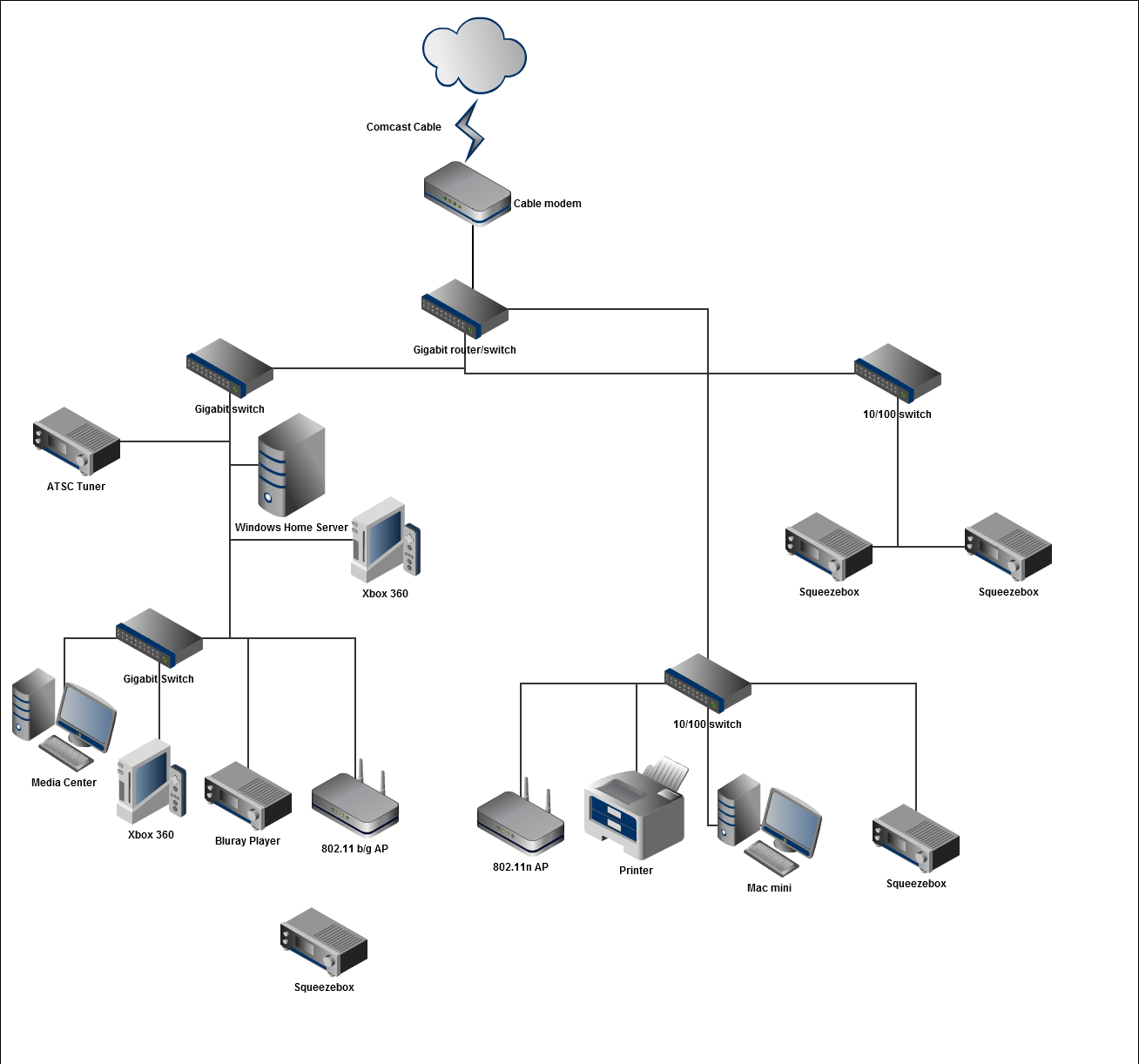
I decide to reorganize my home network, to try and improve things.  I switched things around so all of the media related devices are on the same Gigabit ethernet switch.  Hopefully, this will help prevent bandwidth contention, when attempting to watch television or movies.


Next time I climb up to the attic, I need to label each of the ethernet cables, so I can know which room and port each go to.  Currently, it takes me a few tries to determine what is connected to each.

Sunday, August 1, 2010

Xbox 360 in bedroom

A while ago, I mentioned that my wife bought me the new slim Xbox 360. I was trying to decide where I wanted to set up the old Xbox.  We have been using Linksys Media Center Extenders on each of the other TVs around the house, to give them access to the content on the Media Center.  But the Linksys extenders do not support other content like Netflix streaming.

I decided to set up the Xbox in our bedroom.  (And got the OK from my wife too.)  I have configured it to automatically start up in Media Center Extender mode when the Xbox starts up.  Since I want to access our Netflix streaming account from the Xbox, I created a Xbox Live Gold account for the Xbox, and associated my Netflix account to this Xbox account.

With this setup, I can access:

  • Live and Recorded TV from the Media Center

  • Netflix streaming content

  • DVD content

  • Content from the Zune Video marketplace

  • Hulu, Youtube, and other internet streaming content through the PlayOn server running on the Media Center


Also, we will be able to play games on this Xbox.  (Most likely only when my wife has her woman's group over)

Wednesday, February 17, 2010

HDHomeRun for Media Center

As I have mentioned before, I am looking to cancel our cable TV service.  This weekend I purchased a HDHomeRun Dual network tuner.  The HDHomeRun is an ATSC and QAM tuner that you connect to your network.  You are able to access the tuners with any Mac, PC or linux computer on the network.

I installed it in our attic, where our networking panel is, and the installation was very easy.  All I had to do was connect the antenna cables and connect the tuner to the network.  When I installed the software on one of my computers, I was able to scan for channels and make sure that the antenna was pointed in the right direction.

I was then able to install the tuner software on our Windows 7 Media Center.  The tuners were instantly recognized, and the Microsoft's program guide had all of the data for those channels.  The quality of video is very good.  I can tell that the video is not as compressed as it is through Comcast.

Saturday, February 6, 2010

Setting up D-Link DAP-2553

Our Airport base stations were starting to die.  Every once in a while, the basestations would still broadcast the SSID, and wireless devices could still connect to them but wouldn't transmit any data to our wired network.  Since this was happening to both our Airport Express and Airport Extreme base stations, I assume that there was something, either on the wired network, or some RF interference that was causing them to lock up.

I took this opportunity to upgrade to a 802.11n base station, so I bought the D-Link DAP-2553.  This was one of the few dual-band, non-router, base stations.  Once I set it up,  things have been working a lot better than they were with the Apple base stations.

Tuesday, June 30, 2009

iPhone 3.0 and USASpec adapter

As I have written in my previous posts, I have been pretty happy with the iPhone 3.0 update.  I have been experiencing one annoying problem.

When I connect my iPhone 3.0 to my USASpec PA15-HON2 adapter that is installed in my car, the iPhone stops playing audio and the screen flashes for about a minute, before audio starts playing.  Here are the steps that I use where the problems occurs for me

  • Play a track/playlist

  • Connect the iPhone to the dock

  • => The Radio switches to the cd changer input (correct for my setup)

  • => The screen in the iPhone continues to flash the iPod graphic for about a minute

  • => After about a minute a different track starts playing


Once music is playing, the interface works perfectly.  It will continue to work, until I disconnect and reconnect the iPhone.

I think that the iPhone 3.0 software added some addition scanning that happens when connected to this adapter.

Thursday, May 28, 2009

Hulu Desktop

Hulu has released Hulu Desktop in beta.  This application, for Mac OS X and Windows, allows you to watch Hulu content with only using a remote for control.

I think that this is an interesting move on their part, and you can see why they wanted to stop Boxee from showing Hulu content.  If they will also create a Windows Media Center plugin, that would allow this content to be viewed within the Media Center UI, I will be that much closer to canceling Comcast cable service.

[via Mashable]

Wednesday, May 20, 2009

Netflix on Windows Media Center

Microsoft just released the ability to stream Netflix movies to Vista Media Center.  This is something that Microsoft had implemented in the New Xbox Experience last year.

These implementations allow you to play videos that are on your Netflix instant queue.  It looks like Microsoft did a more functional implementation for Media Center, than what exists on the Xbox .  In addition to letting you play content that is already on your queue, you can browse the whole library of videos available for streaming.  Also, you can manage both your disc and streaming queues.

Saturday, April 11, 2009

Playlist mode with USASpec dock


The USASpec adapter was included as part of the iPhone dock install.  The USASpec adapters have several ways of accessing the music on the iPod or iPhone.  You can access the media either by:


  • Direct - where you need to select the music to play on the iPhone/iPod

  • Folder - where you can browse the music collection by Artist or Album

  • Playlist - where you can preselect some number of playlists that will be easily playable on the headunit


I decided to use Playlist mode, as it also offers the ability to play 6 playlist, also "all songs" and a direct mode.  For the six playlist, it looks for playlist named HONDA1 - HONDA6.  If not all six are found, then it will randomly pick other playlists to fill in the missing spots.  If the adapter is connected to the radio through the XM interface, the playlists are accessed by tuning to channels 1-6.  When using CD changer interface, the playlists appear as CDs.


In addition to playing user playlist, number 7 is used to play all tracks.  And number 8 is for direct mode.  (This is the mode that is used if you want to play Pandora.)


Friday, April 10, 2009

Fixed problem with MyMoves for WHS on Extenders


I have been using My Movies for a while now.  I am using the Windows Home Server version.  My Movies for Windows Home server allows you to keep all of your movies on the server, and play them back in Windows Media Center.  This has been working great.  I have been having problems with playing the movies on the Media Center Extenders


The first problem is that the cover art doesn't appear.  Then when attempting to play the movie, an error would appear that the file could not be found.


This thread on the My Movies forum describes the steps needed to fix the thumbnails on the extender.  I found a similar solution that fixed the video files.  I RDP'd into the Home Server and then went into the "Sharing & Security" setting of the share that has the movie files.  In that setting page I made sure that both "Anonymous Users" and "Everyone" has read access to that share.  Once I did that, everything works great.

Printing Across VLANs: A Secure and Scalable Solution

In my previous configuration, I used a CUPS server with multiple network interfaces to enable printing from computers on restricted networks...