A few months ago, we replaced the head unit in our car with a Kenwood KVT-516. One problem that we have been having is that the in call volume is too low for phone calls. We would need to turn up the volume to hear the caller. Unfortunately, this would affect the volume of music, which would be pretty loud at the end of the call.
It looks like the latest firmware update solves this problem. Now the KVT-516 has separate volume settings for hands-free calls, and other audio sources.

Sunday, May 8, 2011

Squeezebox for Android
I have used several third-party applications for to control my Squeezebox radios from my phones. They each have varying support for the different Squeezebox applications.
It looks like Logitech released their own controller application for Android. This is one of the nicest applications for controlling Squeezebox players. If you have configured applications, you can play content from them.
I do wish that you could add or change alarms from the application.
It looks like Logitech released their own controller application for Android. This is one of the nicest applications for controlling Squeezebox players. If you have configured applications, you can play content from them.
I do wish that you could add or change alarms from the application.
ADW.Launcher
I was looking at trying an alternate launcher for my phone. At first, I took at a look at Launcher Pro, but it requires more permissions than I am comfortable granting for an application launcher. For example, it requests permission for read and write access to my email. I am sure that this is required for a Gmail widget, but since I wouldn't use this widget, and Launcher Pro also has network access, there is a potential for my data to leave the phone.
Instead, it looks like ADW.Launcher does everything that I want in a launcher, without requesting too many permissions. It also has some interesting features:
Instead, it looks like ADW.Launcher does everything that I want in a launcher, without requesting too many permissions. It also has some interesting features:
- Support for themes
- Customizable dock bar and application drawer
- Support for different sizes for widgets
The main thing I like about it is that it doesn' t request too many permissions, so there is less of a security concern.
Wednesday, April 6, 2011
GameFly
There are many video games that I am really interested in the single player campaign, and I that I only play once. Often, I end up paying $60 for the game, and selling it back to GameStop after playing it for a month. Since GameStop doesn't pay that much when buying used games, playing the game for a month often costs about $40.
Since there are only a few games that I play for a long time, I figured I would try GameFly. GameFly is essentially a Netflix for video games. You add video games to your queue, and they send you the games as they become available. When you are done with the games, you can just put them back in the envelope and drop it back in the mail, and the next available game on your queue will be sent.
With the demand for more recent games, it is hard to get the newest games through GameFly. But if you want a game that came out in the past 6 months, it shouldn't be a problem to get it.
If you are interested in trying it, GameFly has an offer, where you can get a month free.
Since there are only a few games that I play for a long time, I figured I would try GameFly. GameFly is essentially a Netflix for video games. You add video games to your queue, and they send you the games as they become available. When you are done with the games, you can just put them back in the envelope and drop it back in the mail, and the next available game on your queue will be sent.
With the demand for more recent games, it is hard to get the newest games through GameFly. But if you want a game that came out in the past 6 months, it shouldn't be a problem to get it.
If you are interested in trying it, GameFly has an offer, where you can get a month free.
Thursday, March 24, 2011
Extending Xbox LIVE Family Membership
A while ago, I transitioned to an Xbox Live Family Gold Pack. This allows us to manage our son's Xbox Live account from a single dashboard, and add Microsoft Points to the Xbox live account that we use on the Xbox in the bedroom.
Amazon had some pretty good deals on Xbox LIVE 12 month membership cards, so I purchased one of these. But,I was not able to redeem the code. I expected that I would be able to apply the 12 month Xbox Live membership to extend my family membership, in my case by 3 months, since I have 4 people in the family membership. But I kept getting errors trying to redeem the code.
When I created the family subscription, I was able to add several Xbox Live Gold accounts, and for each Gold account, the subscription length of the family membership was extended by each. So I figured that I would do the following:
Unfortunately, this didn't work. I was able to complete the first two steps, but when I try to re-add the account, I get an error. It looks like the account is added to the family, but not that account is not part of the subscription. So I won't be able to share Microsoft Points with that that account.
I am hoping that Microsoft starts to sell Xbox Live Gold Family cards (and Amazon sells them for a discount).
Update 5/14/2011: It looks like Microsoft fixed a bug that was preventing this from working. Today I was able to add the account to the Family Subscription, and that extended the subscription by 6 months.
Amazon had some pretty good deals on Xbox LIVE 12 month membership cards, so I purchased one of these. But,I was not able to redeem the code. I expected that I would be able to apply the 12 month Xbox Live membership to extend my family membership, in my case by 3 months, since I have 4 people in the family membership. But I kept getting errors trying to redeem the code.
When I created the family subscription, I was able to add several Xbox Live Gold accounts, and for each Gold account, the subscription length of the family membership was extended by each. So I figured that I would do the following:
- Remove one of the Xbox Live accounts from the family subscription
- Redeem the code on that Xbox Live account
- Re-add the Xbox Live account to the family account
Unfortunately, this didn't work. I was able to complete the first two steps, but when I try to re-add the account, I get an error. It looks like the account is added to the family, but not that account is not part of the subscription. So I won't be able to share Microsoft Points with that that account.
I am hoping that Microsoft starts to sell Xbox Live Gold Family cards (and Amazon sells them for a discount).
Update 5/14/2011: It looks like Microsoft fixed a bug that was preventing this from working. Today I was able to add the account to the Family Subscription, and that extended the subscription by 6 months.
Wednesday, March 23, 2011
Is Marty McFly really better than Biff
I shouldn't have spent as much time on this as I did, but since I did I am posting it.
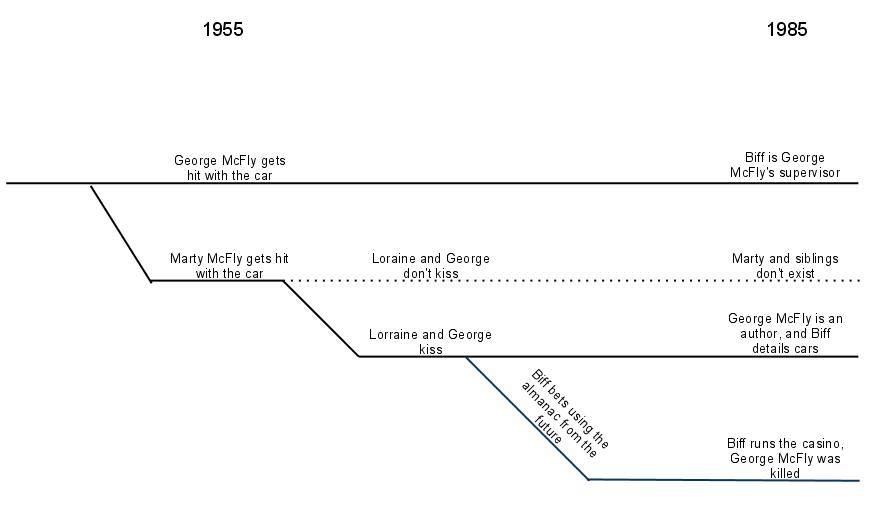
This weekend we watched Back to the Future I & II with our son. While watching the second movie something started to bother me. The main plot of the movie is that Marty had to go back in time to "fix" things, as when Marty returned to 1985, Biff had become a powerful man in the town because his future self, gave him a sports almanac, to allow him to make money by betting on sports.
Why does Marty feel that he needs to "fix" things, when he is arguably his is just as "guilty" as Biff. At the end of the first movie, his actions changed the time line in 1985. Biff was not George McFly's supervisor, and George McFly was an author in the changed 1985

This weekend we watched Back to the Future I & II with our son. While watching the second movie something started to bother me. The main plot of the movie is that Marty had to go back in time to "fix" things, as when Marty returned to 1985, Biff had become a powerful man in the town because his future self, gave him a sports almanac, to allow him to make money by betting on sports.
Why does Marty feel that he needs to "fix" things, when he is arguably his is just as "guilty" as Biff. At the end of the first movie, his actions changed the time line in 1985. Biff was not George McFly's supervisor, and George McFly was an author in the changed 1985
Monday, March 7, 2011
Parental Controls in Windows 7 Media Center
Our kids are getting old enough to be able to use our Media Center, so I have enabled parental controls to prevent them from seeing content that is inappropriate for them. When we had used a TiVo DVR, we had used the parental control and were pretty pleased. The Windows Media Center implementation of parental controls has several peculiarities:
- With parental controls enabled, every time you start playing content, that has a rating higher than the specified threshold, you will get prompted for the PIN. This happens even if you press stop, and then play on the same show. (I like TiVo's implementation, where once you enter the PIN, parental controls will be disabled for a time, or until the DVR is turned off.)
- While in the PIN entry screen, content is playing in the background. So if you take a while to enter the PIN, you will have to rewind to not miss any of the content.
- The parental controls setting is not applied to playing Netflix streaming content, even though Windows Media Center has had support for Netflix content for a while. So it is possible that inappropriate content could be view through Windows Media Center's Netflix interface. (One interesting thing is that the Xbox 360's Netflix streaming implementation respects the Xbox's parental controls setting.)
Subscribe to:
Posts (Atom)
-
 Over the past few days, I've been immersed in the task of replacing the light switches in our century-old house with Lutron light switch...
 -
I have updated the Akismet plugin for LifeType to allow spam comments to be submitted to Akismet . This allows users of LifeType to help ...
-
I bought the updated DVD for our 2004 Honda Odyssey, and the 2.20 version arrived on Friday. I was hoping that, in addition to the updated...